Friday, July 6, 2012

E17 heading towards a Stable Release - No Really!

I've been pushing the Enlightenment desktop for some time now and for as long as I've been promoting it I've also been warning folks that it is under heavy development. Well folks - Duke Nuke'em Forever might have beat them to a release, but E team is prepping for a major (stable!) release themselves.

The E release manager has setup a wordpress you can find here to follow more specific details about the upcoming release. What can you do to help out with getting E17 on the road to release as a end user? Why filing bug reports of course! One thing worth noting is that if you are filing bug reports you should be keeping as close the latest SVN version as possible.

Finally - if it has been awhile since you've tried the Enlightenment desktop now is the perfect time! If you aren't inclined to be compiling software from source Bodhi Linux provides one of the best default implementations of E17 around. Arch Linux and Gentoo also provide fairly current builds of E17 in their community supported repositories.

2012 - the year of an E17 Release!


~Jeff Hoogland

Tuesday, July 3, 2012

Some Bodhi Linux Video Goodness

I'd like to take a moment to share a few wonderful videos one of the Bodhi team members has taken the time to put together. This first is a short sound byte/advertisement for our upcoming 2.0.0 release:


These next two show case the winners of our Desktop of the Week contest:

2nd Quarter Winners 2012


1st Quarter Winners 2012


Enjoy!
~Jeff Hoogland

Is Blizzard banning Linux Users?

While some companies like Valve are working on porting their software to run natively on Linux, it appears some other large companies are going to the extreme to prevent users from running their software on free operating systems.

The company I am talking about? None other than Blizzard Games. Late last month users started reporting on the Wine APPDB page for Diablo 3 that their user accounts where getting banned simply for running their games using Wine! So this is me providing a fair warning to everyone else out there running Diablo 3 via Wine - don't. Unless of course you feel like having wasted 60$ spent to buy the game.

To quote some of the frustrated Linux gamers:

"Well I've had Diablo running on my FreeBSD machine now for a couple of weeks and have a level 53 Wizard.

I just got notice while trying to log in last night that I was banned, and when I checked my email, I hadn't received anything from Blizzard.

After I opened a support ticket with them, a short while later, this is what I received in email:

Account Action: Account Closure
Offense: Unapproved Third Party Software
A third party program is any file or program that is used in addition to the game to gain an unfair advantage. These programs may increase movement speed or teleport heroes from one place to another beyond what is allowed by game design. It also includes any programs that obtain information from the game that is not normally available to the regular player or that transmit or modify any of the game files.

I don't run any programs as described above.

I kite, I die, and then I repair. But hey it's fun."

And a second:

"I got banned last night as well. Other than running under Wine I can't imagine why. Level 30ish char and not so much as a gaming keyboard.

I also have a ticket open. We will see..."

And a third:

"Ditto. I suddenly got a banned email last night, and I'm more or less in the same position. I think they're getting a bit trigger-happy with this, considering I've been running WoW for years under WINE, too.

Ah well, ticket's up."

Please stop the madness Blizzard. You should try focusing your banning efforts on people actually cheating instead of those simply trying to play your games on their OS of choice. If you are looking for more information on this topic there is a fairly good write up about it here.

~Jeff

Tuesday, June 12, 2012

Bodhi Linux ARM Alpha Release for RaspBerry Pi

Edit/Update: You can find the latest release here -> http://www.bodhilinux.com/downloads_mobile.php

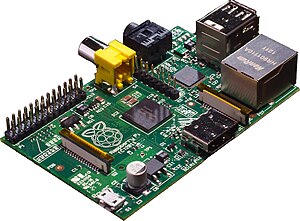
I've been busy with lots of different Bodhi things of the late. The latest of my many projects has been getting the Bodhi desktop functional on the RaspBerry Pi:


This first release while having some rough edges does give you a fully functional Enlightenment desktop on top of a Debian Wheezy ARMEL base. I am providing two different downloads which you can find on our source forge page here. The first is an easy to use .img file that can be written to 4GB or larger SD card.

If you dislike .img files I've also provided tar files that contain the boot partition (which should be written to a vfat partition at the start of an SD card) and the root file system (which should be written to the second partition on a card that is extX).

The default logins for this image are:

bodhi/bodhi
root/raspberry

The "bodhi" user has sudo rights by default.

If you hit any snags or find bugs with this image please let us know in the RaspBerryPi section of our user forums (not the comment section of this blog!) so we can improve this release.


~Jeff Hoogland

Monday, June 11, 2012

Bodhi Linux ARM Release Candidate for Genesi

Edit/Update: You can find the latest release here -> http://www.bodhilinux.com/downloads_mobile.php

Early this year I posted about our beta release of Bodhi on ARM for the Genesi Smartbook. Today I would like to finally follow up that beta release with something that I consider "release candidate" quality. The hardware is 99% functional with this release including the ability to suspend the system. Other small improvements include functional "plug and play" for flash drives and a mostly functional AppCenter!

There are three different downloads provided that you can find here. It is recommended you use one of the provided .img files (and check the md5sum after such a large download!). For developers interested in seeing the raw file system you can also download it in .tar.xz form.

The default login information for this release image are:

genesi/bodhilinux

If you run into any issues please let us know in the Genesi section of our forums.

~Jeff Hoogland

A Bodhi Linux 2.0.0 FAQ

I've been getting a good deal of redundant questions regarding Bodhi's upcoming 2.0.0 release. Today I would like to address a few of the more common questions I've been getting.

When is the release date?

No idea. I live strictly by "its ready when its ready" philosophy for the software I work on. Setting strict release dates causes buggy software to be marked as "stable". Our targeted release month is July - but who knows it could be ready before then.

What is the main difference between 2.0.0 and 1.x.y?

The Ubuntu base is the main difference. Our 1.x.y series is based on Ubuntu 10.04, while 2.0.0 is built on top of 12.04

Can I upgrade my Bodhi Linux 1.x.y install to Bodhi 2.0.0?

No. A full reinstall will be required.

Will there be 64bit support?

Yep.

What are the minimum system requirements?

The minimum system requirements will be about the same as Bodhi 1.x.y. Currently they are looking like:
300mhz processor
128mb RAM
2gig of hard drive space

Will it be faster than Bodhi 1.x.y?

Could be. It will not be slower to say the least.

How big will the disc download be?

Since we do not have a final stable version as of yet I cannot say for sure. Expect it to be under 500mb though.

Can I upgrade from 2.0.0 pre-release to the final 2.0.0 version?

Yep.

I think that about covers all the common questions I have gotten. If you have another question regarding this release feel free to drop a comment below.

~Jeff Hoogland

Friday, June 8, 2012

Filling out my FAFSA on FOSS

I want to remind every out there of something:

Never doubt that your voice matters.

Over a year ago I wrote a post complaining that you where unable to complete the "free application for federal student aide" from an FOSS operating system without first tricking the government's website into thinking you are running Windows.

It was time for me to renew my application (it is something you update every year in the US) and I had my user agent changer all ready to go, but before I simply admitted defeat again I first tried with my normal browser settings. Lo and behold was I surprised! While I was still warned that I was using an "unsupported" browser - the FAFSA website no longer prevented me from filling out the application from said browser.

This is fantastic to say the least - it is a step in the right direction: towards a open internet where the platform you are accessing it from doesn't matter. I would like to say thanks to everyone out there who read my post last year and took the time to contact the FAFSA folks to let them know how stupid their policy was - because apparently they listened!

~Jeff Hoogland