Monday, December 23, 2013

AT&T Connect to Cell System Review

This is a post written by me on behalf of Advanced American Telephones. All opinions are 100% mine.

My wife and I moved into a new townhouse a few months ago and our current cell phone provider (T-Mobile) does not get the best service in our new home. We have found a few spots in the house that get reception, but the rest of it is a giant dead zone. The basement is absolutely out of the question for reception, which I believe is likely an issue for a lot of people.

This past week we acquired a Connect to Cell System by AT&T (CLP99383) and so far we are very impressed with the results. The system is reminiscent of the average landline cordless telephone system but it integrates with cellular devices. Our system includes the main base, two additional charging bases, and three cordless handsets.
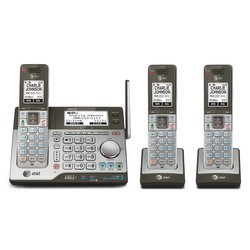
CLP99383

This system seems to have solved the biggest issue with our mobile devices - no service. The system uses bluetooth technology to connect the mobile device to the phone system. We simply have to leave our cell phones in a non-dead zone in the house and then we can use the handsets anywhere else in our home to send and receive calls using our mobile numbers/plans.

Ease of Setup: While my wife is by no means technology-illiterate, she had the system set up and working in just a few minutes without reading the instruction manual. The menus are intuitive and display on-screen instructions when connecting a device via bluetooth. The system supports being connected to up to two mobile devices at once (and a landline if anyone still has one of those).

Not Carrier/Device Exclusive: The system is AT&T branded, but worked with our T-Mobile devices and a friend's Verizon device seamlessly. Further, the system didn't have an issue working with my wife and friend's newer Android devices or my older Nokia N900. So long as your mobile supports a bluetooth headset it should work with the connect system.

Push to Talk Feature: The handsets and base are equipped with push to talk technology, creating an intercom system/walkie talkies for the house (It will be great not having to run up two flights of stairs to have a quick conversation).

Does not improve cell reception: The unit does not increase the reception that we receive in our house, so our phones still only work in certain areas, however the simple solution to this is that we have the base unit set up in an area where we do receive good reception and we leave our mobile devices next to it when we are home. The connect base even has a USB charging port built into it so our mobile doesn't run out of power while connected.

We then have the other units on the other two floors of the house. Leaving our mobile devices near the base ensures a good bluetooth connection (the instruction manual advises a 15ft. maximum distance)

Connect to Cell App: For Android devices, there is an app available in the Google PlayStore called "Connect to Cell." When used, the system will create an alert whenever your mobile device receives a text message, email, or social media update.


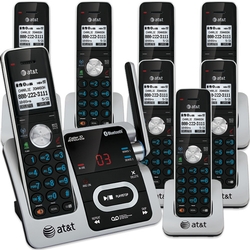
Additional Handsets: My home only has three floors, so I only have two extra handsets in addition to the base. If you have a need for more handsets than this the system supports connecting up to twelve at once.


Closing: Over all I am pretty happy with the Connect to Cell system. It allows me to have the feel of a traditional home phone system without having to pay for an additional service. It also provided a clean solution to having a lack of reception in certain areas of my house.


Cheers,
~Jeff Hoogland

Visit Sponsor's Site

Sunday, December 22, 2013

eAndora - Pandora Internet Radio Client - 1.0 Release

At the start of this year I posted about eAndora, a Pandora Internet Radio client I was working on that is written in Python and Elementary. Today I'm happy to announce that eAndora is finally feature complete enough for me to stamp something as a "1.0" release.

You will always be able to find the latest eAndora source release on source forge here. If developmental code is more your preference you can always find my latest work on github here.

I've tested this release with the latest releases of the Enlightenment Foundation Libraries (1.8.3), Elementary (1.8.2), and Python EFL (1.8.0). It could very well work with previous releases of these things though - for best results always use the latest versions.

Screenshot Tour:

Login Screen

Main Window

Station Creation

Station Selection

If you have any questions feel free to drop a comment below. If you are a Bodhi Linux user the eAndora 1.0 release is currently in our testing repository and will move into the stable branch in January once the EFL 1.8.x series makes its way to stable.

~Jeff Hoogland

Sunday, December 1, 2013

HOWTO: Watch Netflix on Bodhi Linux

Not being able to utilize the Netflix video streaming service has been an issue on the Linux desktop for the past few years. This is due to the fact that Netflix utilizes Microsoft's Silverlight technology for video playback.

For the last few months though we have been able to watch Netflix in our native browsers on Linux using a Wine pluggin wrapper called Pipelight. Today I would like to walk you through the short process of using Pipelight to watch Netflix under Bodhi Linux.

Step 1 - Install Chromium or Firefox

Pipelight needs Chromium or Firefox to work. So if you are still using Bodhi's default browser Midori - you will need to install one of these other two browser. You can obtain your browser of choice by clicking on one of the links below:


Step 2 - Install Pipelight

Next we need to install the Pipelight plugin by clicking on the link below:


Pipelight depends on the Microsoft corefonts package. This means that if you do not already have these fonts installed they will be installed as part of the installation of Pipelight. When installing these fonts you need to agree to an EULA, to navigate to the Accept button you will need to use the tab key, and then press the enter button to select it.

Step 3 - Setup a User Agent Changer

The User Agent is a little code in your browser that tells the page you are viewing what browser you are using. In order for Netflix to even offer us the Silverlight player it needs to think we are on Windows. To do this we install a user agent changer browser plugin. Install the proper plugin linked below for your browser:


After you have the user agent changer installed - set your browser to detect as "Windows Firefox".

Step 4 - Watch Netflix!


Step 5 (Optional) - Add Netflix to the Permanent Spoof List

If you are like me then you hate having to manually click a button and change your user agent string back and forth every time you visit the Netflix site. Thankfully the User Agent Switcher for Chromium as a "Permanent Spoof List". Simply add the URLs shown in the image below to identify as Windows Firefox 3.5 (note the * at the end of the URLs - it is important):


Enjoy! If you have any questions or issues feel free to drop a comment below or open a support request on the Bodhi user forums.

Cheers,
~Jeff Hoogland

Tuesday, November 26, 2013

HOWTO: Test E18, EFL 1.8.0, and Terminology 0.4.0 on Bodhi Linux

As of this past weekend the testing builds of the Enlightenment window manager DR18 (E18 for short) are in the Bodhi Linux testing repository. The following are the steps you need to take if you would like to install and help test the future of the Enlightenment desktop on your Bodhi Linux install.

Step 1 - Add the testing Repository

First we need to add the testing repository to our software sources. Open our sources.list with sudo using the following command:

gksudo leafpad /etc/apt/sources.list

Towards the bottom of the file you will find a line that reads:

deb http://packages.bodhilinux.com/bodhi precise stable

After the "stable" component we want to add the "testing" component. To do this we edit the above line to be:

deb http://packages.bodhilinux.com/bodhi precise stable testing

Save and close the file.

Step 2 - Upgrade to EFL 1.8.0

Open your terminal emulator of choice and run the following command:

sudo apt-get update && sudo apt-get dist-upgrade

This command will tell you that it wants to remove a number of packages (ecore edje eet eeze efreet eina eio embryo emotion eobj ethumb evas). This is fine - all of these packages have been merged into one "efl" package. Let the upgrade command complete.

Step 3 - Install E18

The default "enlightenment" package in Bodhi Linux will remain as the DR17 desktop - we will not be forcing anyone to upgrade to E18 so long as E17 still builds with the latest Enlightenment Foundation Libraries. This means to replace E17 with E18 we need to install the E18 package. In your favorite terminal run:

sudo apt-get install e18

It will tell you it wants to remove the "enlightenment" package - let it. After it finishes installing you should restart your desktop environment. 

Congrats, you now have the E18 desktop to play with!

A few Notes

I would like to remind everyone that this is pre-release software and you should expect to encounter issues. You can report/discuss the issues you are having in the testing section of the Bodhi forums.

At this current point a number of the extra modules (such as places and the engage dock) that the Bodhi profiles use are not currently built for E18. We will be working on adding support for these over the next few weeks.

In this same vein - a number of the existing E17 themes will have issues running under E18. They will all need updates to function with the latest version of the desktop. So when trying to confirm bugs it is always best that you are using the "default" E18 theme when testing things.

If you run into issues getting the testing repo added or the software installed I would encourage you to please open a thread on our user forums as opposed to simply posting a comment below. It is much easier to debug software issues on a forum than in a comments section.

Cheers,
~Jeff Hoogland

Thursday, September 12, 2013

Bodhi Linux 2.4.0 Released

It has been close to six months since our last Bodhi Linux release - far too long! This is just our normal update release - meaning if you are already a Bodhi user and have been running your system updates then you already have all these additions running on your system!

To cut right to the chase - you can find direct downloads of the ISO images on Source Forge here. You can obtain torrent downloads for the ISO images later today.

Before I talk about the small details of this release, I'd like to remind folks that Bodhi is moving to a three times/year update cycle as opposed to the previous four times/year updates we'd been doing. Since E17 stabilized we have less of a reason to power out ISO images as often. Expect new releases in January/June/September from now on.

Also - can you believe it is almost the end of 2013 already? That means Bodhi 3.0.0 is less than twelve months away! It will be out sometime in the summer after Ubuntu 14.04 releases.

Back to the here and now - our 2.4.0 release features three ISO images to install from:

  • 32bit featuring a current PAE enabled kernel
  • 32bit featuring a non-PAE kernel with older hardware support
  • 64bit featuring a current kernel
This release features the E17.4 desktop, version 0.5.5 of the Midori webrowser and the 3.8 Linux kernel. As always - our default theme selection is shaken up.


On a non-Bodhi related note, I'd like to apologize for the lack of new content on my blog for the last few months. Between moving, a new position at work, keeping my wonderful wife happy, and trekking all over the US for my hobby I haven't had nearly as much time to keep up with the latest technology. Hopefully I can find some time in the future to give my musings on things again.

~Jeff Hoogland

Thursday, June 6, 2013

Python - Sorting Lists inside of Lists

In some recent python code I was playing with I had the need to sort a bunch of lists based on elements within their elements. Thankfully python's built in sort function is plenty powerful and allows us to do this in a fairly easy manner. So for example if we have a list all of whose elements are also lists:

mylist = [["derp", 1, 7], ["bleh", 2, 0], ["merp", 0, 3]]

By default when we call the sort function on this list it will sort the sublists based on their first element in lexicographic order. For example:

mylist.sort()
print mylist
[['bleh', 2, 0], ['derp', 1, 7], ['merp', 0, 3]]

What if we don't want to sort these lists based on their first element though? By using the key argument we can sort our sublists based on any element we want. For example to sort the lists based on their second element we would use:

mylist.sort(key=lambda e: e[1])
print mylist
[['merp', 0, 3], ['derp', 1, 7], ['bleh', 2, 0]]

Or their third element:

mylist.sort(key=lambda e: e[2])
print mylist
[['bleh', 2, 0], ['merp', 0, 3], ['derp', 1, 7]]

Special thanks to the folks over at #python on freenode for helping me figure this little bit out. They are an extremely resourceful bunch. You can learn more about working with python lists here.

Cheers,
~Jeff Hoogland

Friday, May 31, 2013

Dated Hardware, Waiting for Hardware and the Nokia N900 in 2013

The Nokia N900 was released in November of 2009 - three and a half years ago. When I bought my first N900 in January of 2010 it was a huge upgrade for me in terms of both speed and software freedom (coming from a Blackberry). The idea of having a computer - a true computer - that was also a phone was amazing. The same device I used to send text messages, I also installed applications on using apt-get. True multitasking - my applications stayed open until I closed them, not until the operating system decided it wanted to kill them. I didn't mind paying the 450 USD it cost to purchase the brand new N900 out of contract - this was an awesome piece of technology!

Fast forward to 2013. Three years later I have gone through 2.5 Nokia N900s (I say 2.5, because the first two each broke in different ways and I was able to build a working device from their left overs) and still have it sitting on my desk as I write this. Three years is a long time in the world of mobile hardware and the N900 easily shows plenty of signs of aging. Compared to my wife's Nexus 4, it loads applications and web sites slowly.

So why is it I hold onto hardware/software that deserves an upgrade? Simple - no one has released a comparable replacement. At first I did not want to trade my true Linux operating system in for this dribble called Android everyone raves about. Upon giving Android a chance though - I could make do with it. The HTML5 supporting browsers on Andriod really provide a decent web experience (which beyond text messaging is what I mainly do on a mobile device).

The hold up then? The hardware. I'm not talking about the speed of the hardware though - I'm talking about the lack of design. Almost every modern mobile that is sold today is a pure touch device. Hardware keyboards are a thing of the past it seems.

Am I truly the last person left alive who doesn't like a software keyboard taking up half of my sub-10 inch screen while I type something?

When I search for modern cell phone hardware I certainly feel that way.

I have hope though! Within the next year we are expecting at least three new mobile operating systems to enter the landscape:
  • Ubuntu Mobile
  • Tizen
  • Firefox Mobile
I hope against all open that one of the hardware makers supporting these operating system breaks the current tread of touch-only devices. Maybe then I and stop picking up old N900s on Ebay when my existing one breaks!

~Jeff Hoogland