Showing posts with label cxgames. Show all posts

Saturday, July 31, 2010

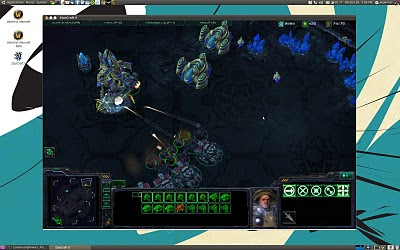
HOWTO: Starcraft 2 on Linux with Wine

Okie dokie - so I've mentioned before that I play Starcraft 2 under my Linux install with no issues. Since the game's official release a few days ago I have been getting a good bit of traffic on those two pages - so I figured I would put together a quick HOWTO for getting Starcraft 2 working on your Linux distro of choice. The game runs under Wine 1.2 and/or Crossover Games 9.1 with a small bit of work (the latter is easier to make work).

Since free is good I'll talk about the Wine HOWTO first. First off, download and install Wine 1.2 on your system. Next, run the following commands in terminal:

cd ~/Downloads
wget http://winezeug.googlecode.com/svn/trunk/winetricks
chmod +x winetricks
./winetricks droid fontfix fontsmooth-rgb gdiplus gecko
./winetricks vcrun2008 vcrun2005 allfonts d3dx9 win7
winecfg

In the configuration Window it opens go to the libraries tab and enter mmdevapi in the new override for library box and click add. Now scroll through the existing over rides list for mmdevapi click edit and set it to disabled. Finally click on the audio tab and set it to alsa.

If you still have audio issues after doing this and your distro uses Pulse Audio (Ubuntu does) install Wine 1.2 that has been built with pulse audio support with the following commands in terminal:

sudo add-apt-repository ppa:c-korn/ppa
sudo apt-get update && sudo apt-get upgrade

As of Crossover 9.1 Starcraft 2 is listed as "officially support" and as such you will find that it has an entry in the automated games installer. The only issue is that after the game has actually finished installing the StarCraft 2 process hangs around - meaning Crossover never actually knows that the game has finished installing and thusly never creates menu entries for it. Thank fully there is a simple fix for this - after Starcraft 2 has finished installing, open up your system monitor and look for any rogue Starcraft 2 processes and kill them off. After you have done this the CXGames installer will know that it has finished installing and will create the menu entries as it should.

If you have audio issues under Crossover you can open your Starcraft 2 bottle's WineCFG, select the audio tab, and set hardware acceleration from full to emulated.

Also - if you are trying to install from the retail CD (with Wine or Crossover) you might need need to manually mount the disc due to an issue with its split PC/Mac auto mounter. To do this run the following two commands in terminal:

sudo umount /media/SC2*
sudo mount -t udf -o ro,unhide,uid=$(id -u) /dev/cdrom /media/cdrom

Note some drives may use /dev/sr0 (or other mount points) instead if /dev/cdrom. If you are having issues getting it working scroll through the comments for some good tips - if you are still unable to get it working after that, make a comment of your own :)

Also - if you are attempting to get the game running with an ATI card, it was suggested in the comments that making it run under a virtual desktop allows it to run on some systems it otherwise fails to work on.

I tested the above methods on Ubuntu 10.04, Linux Mint Debian, and Chakra - but they should be applicable to any modern Linux distribution. Have any issues feel free to drop a comment below and I will do my best to lend a hand debugging. Happy gaming!

~Jeff Hoogland

Thursday, May 13, 2010

CXGames 9.0 - Hands on Review

Back on October of last year I did a comparison of Cedega and CXGames. As of yesterday Codeweavers launched their CXGames 9.0. If we had heard any news or updates from Cedega in the last five months this would be an updated comparison, but since Cedega has not changed I simply am going to be reviewing the newly released CXGames.

The first thing you will notice when using CXGames 9.0 if you had used past versions is that the GUI has under gone a refreshing change.

Application Installer:

Bottle Manager:One of the key things you will notice when installing a game is that there are now "profiles" built in for games. Officially supported games have a profile as well currently a handful of other games. Similar to how Cedega works people can now submit the Wine settings they use to successfully run a game to Codeweavers so others can replicate these settings with a single click from the installer. With the number of users Codeweavers has accumulated over the years I have no doubt that we will soon see profiles for the multitude of gold and silver rated unsupported applications listed in the Codeweaver's data base.

New GUI, game profiles, what else is new in CXGames 9.0? A much needed Wine version upgrade has been added to this release. CXGames is based off of the recently released Wine 1.1.42. If you are not aware newer Wine versions often times include many bug fixes that can allow applications that had failed to run under Wine in the past to suddenly start working. The benefit of purchasing commercial Wine software such as CXGames is that while you gain all the benefits of an updated Wine version you do not have to worry about experiencing any regressions that may have found their way into the Wine base.

From a gamer's aspect the most important thing about this new release is added support for the recently released Steam GUI. The new interface for the Steam content delivery service I find runs much better under CXGames 9.0 than the old Steam interface ever ran under past Crossover versions. CXGames 9.0 also advertises added support for StarTrek Online and the Starcraft 2 Beta. There is a profile under "unsupported applications" for StarTrek, I am not much of an MMO guy so I have not tested this game yet. Upon searching for an entry for Starcraft 2 you will not find one, on the Crossover forums one of the staff makes the claim that it just works OOTB when selecting "install other application". I can confirm this is not the case. By default SC2 crashes at upon startup, after some tweaking I have it at least showing me a loading screen (even though it freezes with no terminal output).

Finally I always like to mention cost, CXGames 9.0 continues to be 40$ (this includes one year of support and updates). Overall CXGames 9.0 is another great release in a fantastic product line. The GUI updates are for the better, the game profiles work well, and a newer Wine version is always appreciated. If you are a Steam gamer on Linux then CXGames 9.0 is a must have, if Starcraft 2 under Linux is what you are looking for you are going to have to pass on CXGames for the time being - but I have no doubt that by the time SC2 releases at the end of July it will be fully supported under Crossover.

~Jeff Hoogland

Saturday, May 8, 2010

Why there is a Market for Linux Games

Linux users are starved for quality games - there is no doubting that. Bring up the topic of a Linux port on most gaming forums and you will typically see responses about the market share of the operating system, that Linux users are cheap (thus why they use a free operating system) or there are too many package formats to support (which really is a non-issue). I'm not even going to bother trying to argue the point of market share, we all know Windows is a large majority and Linux is the under dog - lets leave it at that.

Lets stop and think about something for a moment - nowhere near all of those Windows users are gamers. In fact with the world we live in that is so heavily populated with consoles I would be surprised if even half of the people using Windows are the type that go out and purchase the latest and greatest PC games (or even play casually). Linux users on the other hand are typically a more tech savvy bunch and tech savvy people more often than not tend to gravitate towards being gamers.

Alright - enough speculation and assumptions, lets look at some cold hard numbers. Two recent games that had successful Linux ports would be 2DBoy's World of Goo and Frictional Game's Penumbra Series. 2DBoy reported that since they released their Linux port of the game 10% of their total game sales have been for the Linux platform. Frictional Games reports a similair statistic - in fact 12% of their sales for the Penumbra series up to this point are for the Linux operating system.

Still need more convincing? If you have not been made aware of it yet as of my posting this there are still two days left to participate in the Humble Indie Bundle experiment. The Humble Indie Bundle offers your five games (including World of Goo and the first of the Penumbra series) at what ever cost you can afford. All five of the games are fully cross-platform (Windows, OSX, Linux) and when you make your donation you are asked to mark which operating system you are purchasing the games for. Take a look at the following statistics up until this point from the donations they have received:
Judging by that pie chart Linux users appear to make up almost 25% of the donations and their average donation amount is almost double that of the average Windows user donation. This means that of the 571,048$ donated thus far 142,762$ is from Linux users. But remember Linux users are cheap and their is no money in Linux game market - right.

Games that already exist on only the Windows platform need ports as well. In fact there is so much demand for some of these games to run on Linux that Codeweavers has a business commercially supporting many of these titles on the Linux operating system (it's not perfect - but for now it works).

I can huff and puff about the facts and statistics till I am blue in the face, but the point is this: There is a market for Linux gaming and one that is still largely untapped at that. If you are a game developer I implore you to please port your game to Linux!

Anyone know of any other games released for Linux that have been successful? Let me know! I am always interested in picking up a new game that runs natively on my systems.

~Jeff Hoogland

Monday, May 3, 2010

Some WINE with your Starcraft 2?

EDIT: If you stumbled upon this page looking for a HOWTO for getting Starcraft 2 working under Wine check here.

It finally happened. I have a Starcraft2 closed beta key! What feels like decades ago now I had applied for a Starcraft2 beta key on Battle.net and had all but given up hope after many months of waiting when a friend was kind enough to give me one of his invite passes. I entered the key into my account and was thoroughly excited when I saw the beta appear in my downloads. I was clicking through the website as quick as I could so I could get the game downloading, when reality came crashing down on top of me as I hit the downloads page and was asked to choose between a Windows and an OSX client.

What is a Linux user to do? With the recent release of Ubuntu 10.04 I had removed Windows 7 from my hardrive as it had not been booted into in over a month and was simply taking up storage space. My first thought was to simply reinstall Windows 7, giving it just enough space to boot and install Starcraft. Then I thought about the fact that I almost never reboot my system and that having to restart just to play Starcraft would be a real kill joy (and a time waster).

I run all of my source engine games on Linux via CXGames however upon looking at their entry for Starcraft II I had little faith that it would work under Crossover. Not quite ready to give up hope yet I headed over to the WINE AppDB entry for SC2, lo-and-behold it had a gold rating! Browsing through the page you will find a wonderful HOWTO for recompiling WINE from git with a custom patch for SC2. Always one to jump in with both feet first I promptly uninstalled my current WINE version from my system and began downloading/compiling a patch version of 1.1.43 Twenty minutes later (I have a fairly good processor) I had the patched version of WINE built and installed. I then proceeded to download the beta client and get it installing under WINE (I also followed the directions here that contains some extra tweaks for running the beta under WINE, it also installs SC2 to it's own WINE prefix).

I have been happily playing Starcraft 2 under Ubuntu 10.04 for the last three days now. All I have to say is that it is a true testament to how much progress the WINE project has made in recent years when it can be counted upon to run a new title that hasn't even been fully released yet! Performance under WINE is not perfect, but on lower settings it is more than playable (which is what really counts). There seems to be a processor bottle neck on higher detail settings (also present in L4D2 under WINE actually) that hinders performance.
~Jeff Hoogland

Monday, March 8, 2010

Steam Client and Source Games Porting to OSX

So the devil called me this afternoon and said they where having a snowstorm in hell.

In other news Valve announced that their revolutionary "content delivery service" known as "Steam" is being ported to OSX and will be available as early as April 2010. No really its true, straight from the horse's mouth. In addition the actual client and "Steam-works" being brought to Apple's operating system Valve also plans to port all of the Source Engine games, these include:
  • Half Life 2 Series
  • Counter Strike: Source
  • Team Fortress 2
  • Left 4 Dead Series
  • Day of Defeat: Source
All I have to say is: Microsoft has to quaking in their boots. For some time Microsoft's Windows operating system has been the standard for gaming on the PC. With Valve making the push into OSX this means more than just trouble for Microsoft's operating system. It also means their famed DirectX API that is Windows only may be in jeopardy. I say this because as stated in Valve's official announcement in order to port their engine/games to OSX they will be reimplementing them in OpenGL. After the porting of these past released source games Valve plans to treat OSX as a "first tier" operating system. Meaning that all future releases of source games will occur simultaneously for OSX, Windows, and Xbox 360.

Not a fan of Valve's flag-ship gaming engine? Not a problem, take a peak at these other titles already for sale on Steam that have a native OSX client:
  • Aliens versus Predator (original)
  • Altitude
  • And Yet It Moves
  • Ankh: Battle of the Gods
  • Ankh: Heart of Osiris
  • Aquaria
  • BioShock
  • Braid
  • Brainpipe
  • Broken Sword: The Shadow of the Templars
  • Broken Sword II: The Smoking Mirror
  • Call of Duty
  • Call of Duty: United Offensive
  • Call of Duty 2
  • Call of Duty 4: Modern Warfare
  • Championship Manager 2007
  • Championship Manager 2008
  • Championship Manager 2010
  • Civilization IV
  • Civilization IV: Beyond the Sword
  • Civilization IV: Colonization
  • Civilization IV: Warlords
  • Command & Conquer: Red Alert 3
  • Darwinia
  • DEFCON
  • Delta Force: Black Hawk Down
  • Deus Ex
  • Doom
  • Doom 3
  • Doom 3: Resurrection of Evil
  • Doom II: Hell on Earth
  • Dragon Age: Origins
  • Elven Legacy
  • Enemy Territory: Quake Wars
  • Eschalon: Book I
  • Europa Universalis III
  • Europa Universalis: Rome
  • FlatOut 2
  • Final Doom
  • Football Manager 2009
  • Football Manager 2010
  • Football Manager Live
  • Freedom Force
  • Grand Theft Auto: San Andreas
  • Harvest: Massive Encounter
  • Hearts of Iron II
  • Hearts of Iron III
  • Heretic
  • Heroes of Might and Magic V
  • Hexen
  • Hexen II
  • Indiana Jones and the Fate of Atlantis
  • Indiana Jones and the Last Crusade
  • Jade Empire
  • LEGO Batman: The Videogame
  • LEGO Indiana Jones: The Original Adventures
  • LEGO Indiana Jones 2: The Adventure Continues
  • LEGO Star Wars: The Complete Saga
  • Loom
  • Luxor
  • Luxor 2
  • Luxor 3
  • Machinarium
  • Multiwinia
  • Osmos
  • Peggle
  • Peggle Nights
  • Penguins Arena
  • Penumbra: Black Plague
  • Penumbra: Overture
  • Penumbra: Requiem
  • Plants vs. Zombies
  • Prey
  • Prince of Persia (2008)
  • Puzzle Quest: Challenge of the Warlords
  • Quake
  • Quake II
  • Quake III Arena
  • Return to Castle Wolfenstein
  • Rome: Total War
  • Samorost 2
  • Shaun White Snowboarding
  • Sid Meier’s Pirates
  • SiN
  • Spore
  • Star Wars: Force Unleashed
  • Star Wars Jedi Knight II: Jedi Outcast
  • Star Wars Jedi Knight: Jedi Academy
  • Star Wars: Dark Forces
  • Star Wars: Knights of the Old Republic
  • Tales of Monkey Island
  • The Chronicles of Riddick: Assault on Dark Athena
  • The Dig
  • The Graveyard
  • The Path
  • TOCA Race Driver 3
  • Tom Clancy’s Rainbow Six 3: Raven Shield
  • Tomb Raider: Anniversary
  • Torchlight
  • Unreal
  • Unreal Tournament
  • Unreal Tournament 2004
  • Uplink
  • Virtual Families
  • Warhammer Online: Age of Reckoning
  • World of Goo
  • X²: The Threat
  • X³: Reunion
  • X³: Terran Conflict
Phew! Who was it that said you couldn't game on a non-Windows operating system? Well truth be told thanks to wonderful software like CXGames some of us have been enjoying source games on the operating system of our choice for some time now. (Food for thought and maybe a future topic: What do you think this announcement is going to do to Codeweaver's bottom line?)

What brought this seemingly sudden announcement from Valve? Well a few months back a rumor had surfaced that a lead Steam developer had posted looking for people with experience porting Windows software to OSX and Linux.

Yep, that is right and Linux.

While there is still nothing official about the latter of these two operating systems from Valve, all I have to say is that the porting of Source Engine to use OpenGL only makes the eventuality of them running without emulation on Linux much more likely (not to mention in the mean time Windows games that run under OpenGL tend to perform better under Wine).

~Jeff Hoogland

Thursday, January 21, 2010

Is Cedega Hanging in There?

In one of my past articles I made a bold assessment that it appeared Transgaming might be dropping support for their Cedega Wine software. However it now appears that Cedega might be hanging in there - After more than a year of silence there was finally an update posted in Cedega's "Den" (announcements section). The post promises the certification of two games, Torchlight and Defense Grid: The Awakening, that happen to work well under their "recently" released 7.3.3 engine (The latter of the two pleases me greatly, I had purchased DG on Steam over the holidays and it does not function properly under Wine/CXGames as of yet). Also provided is a very vague "Development Update" that promises better OpenGL performance and mentions that at some point in the near future we should see a more detailed development plan - Alas two weeks later and still nothing.

In the end what does all this mean? Maybe nothing, but then only time will tell. I'm hoping that Transgaming gets around to posting development updates faster than they have been about fixing their application voting system (which has been non-functional for close to two years now). If Transgaming want's to save their Linux product they need to get on the ball - and quick. They are no longer the only big player in the world of commercial "Win-on-Lin" for gaming. Codeweavers has already posted their plans for development in 2010 and since they already support L4D2 (one of the most recently released hit PC titles) Transgaming is going to be hard-pressed to play catch-up.

As I've said in the past: I think Cedega is good software, however there is more to buying software than just the product itself. Here is to hoping Transgaming can get their customer service act together in 2010, because - while I like CXGames, competition is a wonderful driving factor in the business world.

~Jeff Hoogland

Sunday, January 3, 2010

Wine, CXGames, and Windows 7 Performance Comparison

I blog more than a little about Wine software. In the past I have run benchmarks between the most current pieces of Wine technology out there and how they compare with each other. However one important question many gamers have when looking to game on Linux is not so much how do the different Wine technologies compare with each other so much as how do they perform compared with the program(s) running natively on Windows? Since I finally installed Windows 7 I figured I would take a look into just how well my favorite non-emulators stack up against the native platform for a few 3D applications.

The Tests: I ran both a synthetic benchmark (3D Mark 2001se) as well as some actual game applications (TF2, L4D, & L4D2). Each test was run several times under Wine/CXGames/Windows to ensure that the scores are as accurate as possible.

The Hardware: While my hardware is not fastest in the world it is (as of posting this) relatively new and decently quick. Processor - Intel p9700 2.8ghz Dual Core, RAM - 4gigs of DDR3, Video Card: nVidia 260m with 1gig DDR3 dedicated memory.

Operating Systems and Drivers: Ubuntu 9.10, running the nVidia 190.53 driver & Windows 7, running the nVidia 195.62 driver

The Wine Software: Wine version 1.1.35 (with extra fonts and the d3dx9 packages installed via Winetricks) and CXGames 8.1.4 - both of these are the latest versions as of my posting this.

The Results:
3D Mark 2001 SE
  • Resolution: 1680x1050
  • - Wine Scored: 18497
  • - CXGames Scored: 18538
  • - Windows 7 Scored: 31573
  • Resolution: 1024x768
  • - Wine Scored: 22141
  • - CXGames Scored: 23265
  • - Windows 7 Scored: 35508
Team Fortress 2
  • Resolution: 1680x1050
  • - Wine: 65.11 fps
  • - CXGames: 61.78 fps
  • - Windows 7: 87.13 fps
  • Resolution: 1024x768
  • - Wine: 81.82 fps
  • - CXGames: 70.68 fps
  • - Windows 7: 101.88 fps
Left 4 Dead
  • Resolution: 1680x1050
  • - Wine: 13.76 fps
  • - CXGames: 27.36 fps
  • - Windows 7: 63.48 fps
  • Resolution: 1024x768
  • - Wine: 19.93 fps
  • - CXGames: 35.38 fps
  • - Windows 7: 65.65 fps
Left 4 Dead 2
  • Resolution: 1680x1050
  • - Wine: n/a
  • - CXGames: 38.45 fps
  • - Windows 7: 72.04 fps
  • Resolution: 1024x768
  • - Wine: n/a
  • - CXGames: 56.46 fps
  • - Windows 7: 111.68 fps
Things Worth Noting: Obviously all the applications run faster natively under Windows than they do under Wine technology (I hope no one is surprised by this). Secondly I'd like to point out the FPS averages for Wine 1.1.35 and CXGames 8.1.4 have improved from older versions. Lastly I feel I should mention the n/a score Wine has on Left 4 Dead 2 - this is because try as I might no matter what hacks/cracks I throw at Wine I can still not get Left 4 Dead 2 to play for me under Wine.

Wrapping Up: Obviously if you are extremely worried about getting every last FPS out of your video games you should stick with Windows - however depending on your hardware and what games you are playing Linux may very well be capable of playing them at a satisfactory level (remember the human eye can only see 60 fps, so anything higher is overkill). Also remember that with almost every new release Wine continues to further advance it's performance so be sure to check back for new benchmarks/scores as new versions are released.

Happy New Year to everyone and keep on fragging!
~Jeff Hoogland
Please note while these benchmark scores presented are accurate to the best of my abilities, they only represent my personal hardware and software configurations. Your results on your own system(s) may vary (and if they do, please share them!).

Friday, November 20, 2009

CXGames 8.1 (Zombie Mallard) Overview

Left 4 Dead 2 was one of the most anticipated games of 2009 (even with the boycott). Even before its full release (the demo opened to players a few weeks prior) the good people over at Codeweavers where hard at work making sure their CXGames software would be ready to allow Linux/Mac gamers everywhere to fully enjoy this latest edition to Valve's source games. Less than twenty four hours after L4D2 hit shelves (digital and otherwise) CXGames 8.1 (codename Zombie Mallard) was released.

This newest update to the CXGames line is really just a small update (as the version number increase of .1 implies) rather than a full upgrade. In fact depending on what games you play - you might not even notice a difference between this and the previous 8.0 release. From the official 8.1 change log:
  • Add support for Left 4 Dead 2
  • Fix a problem with directory permissions in World of Warcraft in Ubuntu 9.10
  • Fix a number of problems with Guild Wars
  • Fix a number of Mac audio issues which should fix Steam voice chat
  • A few minor adjustments for Snow Leopard
  • Fix a bug registering CrossOver under Snow Leopard
What makes this release so special then? I feel it important because it displays Codeweaver's dedication to their product. They are obviously aware of what their users want and what is going on in the gaming community at large. This CXGames update, I feel, shows how they plan to react to big releases in the future. I say this because the main reason for this CXGames update is to add support for L4D2 (in addition to the various other small bug fixes listed). This gives me great hope that they will be quick to the draw in their supporting of other soon to be release big name titles such as Starcraft II and Diablo III. As a side bar I feel it is also worth mentioning that performance under CXGames 8.1 is about the same as it was under 8.0 (And Left 4 Dead 2 benchmarks about the same as L4D)

All in all I am very pleased with this latest release of CXGames and for any Linux gamer who wants to quickly and easily rock out on L4D2 there is no doubt about it - "Zombie Mallard" is a must have (as L4D2 fails to run at all under Cedega). Hopefully I will catch some of my fellow Linux Gamers online putting bullets into the brains of the walking-dead some time soon :) Happy Fraging All!


~Jeff Hoogland

Friday, November 13, 2009

Wine, Cedega, and CXGames Benchmark Comparision

In one of my earlier postings I did a compare and contrast of the various different features Cedega and Codeweavers offer. Today I am going to try leave my opinions aside and stick strictly to the numbers. Source Engine games are some of the most popular played today so I feel it is only fitting I use them to test the Wine software we have today.

The Test: I will be running an FPS test under both the original source engine (Counter Strike: Source) and the latest version of the source engine (Left 4 Dead). For each test I used the same detail settings and tested each game at three different resolutions, using each Wine, CXGames, and Cedega.

The Hardware: While my hardware is not fastest in the world it is (as of posting this) relatively new and decently quick. Processor - Intel p9700 2.8ghz Dual Core, RAM - 4gigs of DDR3, Video Card: nVidia 260m with 1gig DDR3 dedicated memory.

The Software: Ubuntu 9.04 (Jaunty), 64bit. Running the nVidia 190.42 driver

The Wine Programs Used: The following test results where obtained using CXGames 8.0.0, Cedega 7.3.3, and a vanilla install of Wine 1.1.32 (all latest versions as of today).

The Results:
Counter Strike - Source
  • Resolution: 1680x1050
  • - Wine: 72.29 fps
  • - CXGames: 153.03 fps
  • - Cedega: 113.83 fps
  • Resolution: 1024x768
  • - Wine: 49.33 fps
  • - CXGames: 163.03 fps
  • - Cedega: 119.22 fps
  • Resolution: 640x480
  • - Wine: 63.23 fps
  • - CXGames: 179.94 fps
  • - Cedega: n/a
Left 4 Dead
  • Resolution: 1680x1050
  • - Wine: 12.41 fps
  • - CXGames: 25.46 fps
  • - Cedega: 31.69 fps
  • Resolution: 1024x768
  • - Wine: 25.37 fps
  • - CXGames: 20.25 fps
  • - Cedega: 68.34 fps
  • Resolution: 640x480
  • - Wine: 20.7 fps
  • - CXGames: 22.05 fps
  • - Cedega: 67.83 fps
Things Worth Noting: As you can see all three are able to perform the first test at a relatively decent FPS - however both Cedega and CXGames far out perform a vanilla Wine install. Also worth noting is the fact that Wine actually took a performance decrease when running at lower resolutions (I was very surprised by this, in fact I ran the test three times at each resolution just to confirm it was accurate). I'd like to point out as well that Cedega failed to load CSS for me in the 640x480 resolution - thus the n/a score.

Left 4 Dead is where we really see a difference between the different pieces of software. Both Wine and CXGames where unable to break the 30fps marker while Cedega was able to snag 31fps on my high resolution and over twice that frame rate on lower resolutions.

Wrapping Up: Please remember to take my above listed scores with a grain of salt - as your own mileage may very well vary depending on your particular configuration. Also remember the Wine install I used was a vanilla install. Meaning that odds are it could stand to be tweaked a bit to get a slightly better frame rate. Lastly remember when trying to get the most out of your Linux Gaming experience be sure to optimize where ever you can.

~Jeff Hoogland
Please note while these benchmark scores presented are accurate to the best of my abilities, they only represent my personal hardware and software configurations. Your results on your own system(s) may vary (and if they do, please share them!).

Thursday, November 5, 2009

My Linux Gaming Experience

Arguably gaming is the one place in which Linux is sorely lacking. Very few titles release with a native installer for this platform and as such many say gaming is impossible on Linux. This is just not true. For a long time I was a "hardcore" gamer, spending easily over forty hours a week in front of my computer playing various online games. In the last couple years I have slowly moved into the "casual" gamer category. On average I spend between ten and twenty hours a week currently playing various PC games. As they are PC games very obviously I run them on my computer and my computer only contains an Ubuntu as an operating system - as such this also means all the games I play run on Ubuntu. Ubuntu is fully ready for desktop systems and for a casual (or in some cases even hardcore) gamer it is more than capable of running most of the important titles. The following are games I enjoy on a regular basis on Ubuntu (and how I run them):

Starcraft - Wine with Windows version set to 98
Warcraft III Frozen Throne - Wine with default settings
Diablo 2 - Wine with default settings
Counter Strike: Source - Wine with default settings. I set the game to run with dxlevel 81 to obtain a better FPS
Team Fortress 2 - Wine with default settings. I set the game to run with dxlevel 81 to obtain a better FPS
Left 4 Dead - Cedega using the Left 4 Dead profile.
Left 4 Dead 2 - CXGames with default settings
Borderlands - Cedega using the UT3 profile
Unreal Tournament 3 - Cedega using the UT3 profile
Killing Floor - Cedega using the UT3 profile
Unreal Tournament 2004 - Native Linux Installer
Savage 2 - Native Linux Installer
Morrowind - Wine with default settings
Oblivion - Wine with default settings
Crysis - Cedega using the UT3 profile and a few native dll over rides
Half-Life 2 - Wine with default settings
Pirates, Vikings, and Knights - Wine with default settings
Guild Wars - Wine with default settings
Day of Defeat: Source - Wine with default settings. I set the game to run with dxlevel 81 to obtain a better FPS
Dark Messiah Might & Magic - Wine with default settings.

As you can see its a fair size list of games. These are just the ones I play personally there are many more than run just fine under Linux. Check out the Wine Applications Database to see how well others fare with various applications.

~Jeff Hoogland

Saturday, October 17, 2009

Cedega vs Crossover Games - Hands on Review

Most people who use Linux for desktop use are well aware of the one of the largest issues facing the platform: Lack of commercial software. Now in most cases this is not an issue, no MS Office - use OpenOffice, no Internet Explorer - use FireFox. However one thing which there is currently no replacement for is gaming. Try as they might there are just not enough Open-Source game developers (or even closed-sourced ones) that bring the level of gaming quality, as of yet, to Linux that Windows enjoys.

Enter the world of Win-on-Lin. The Wine Project, was started in 1993 and has slowly come into maturity over the course of the last sixteen years. Wine is a compatibility layer, or more precisely a reimplementation of the Windows API, that allows Windows applications to run under Linux. While the Wine project does a wonderful job of what it is designed to do (run Windows applications on Linux) how ever it sorely lacks in the means of a GUI front end for easy configuration/calibration.

Which brings me to my topic at hand - Cedega & Codeweavers. What are Cedega and Codeweavers? They two (closed source) programs both based off of the Wine Project to create what it lacks - a user friendly interface. Designed to help you get your Windows games working with ease on Linux. They both have their ups and downs and today I am going to look at each program and see how they compare. I currently have both Cedega and Codeweavers licenses so all the information given is from first hand experience working with both products. I'm going to be judging based on following criteria:
  1. Functionality - How well do they do what they are suppose to do?
  2. GUI Front End - How do the front-ends between the two compare?
  3. Website - Being able to find information is everything, how do the websites compare?
  4. Customer Service/Support - If you are paying for a product you want to know you can get help with it if it doesn't work properly.
  5. Fees & Licensing - How much do they cost and what are you paying for?
Functionality -

Cedega does a fairly good job of helping the user get their programs up and running. Upon selecting install it auto-detects any disc drives on the system for known game discs it can install. If it does not find any (or finds the wrong one) it is easy enough to direct it to the proper file/disc via the GUI. One of the things I really like about Cedega is the large number of pre-defined profiles it contains for different game titles (and just because you game isn't listed doesn't mean it will not work). Basically what this means is when you install a game that has a profile it automatically uses what are known to be the "best Wine settings" to get the optimum performance out of your game.

While Cedega does a great job at actually running the important parts of your games it is obvious that certain aspects of some programs have been neglected, Steam for instance works fine for loading and playing games but the friends network does not work in the slightest and installing flash for it is difficult at best.

Also worth noting here is that while Cedega started off as a fork of the Wine project (version 4.0 and earlier of Cedega was known as WineX or Wine Extreme) initially, it is no longer associated with it. Because of this of this fact the Windows API behind Cedega is also now different from that which powers Wine and as such there are a few applications that will not function under Wine (or things powered by Wine) that perform with out a hick-up under Cedega.

All in all I'm giving Cedega a 9 out of 10 points for functionality - it is a good software.

Functionality 9/10 - Cedega Total 9/10

Upon opening the Codeweavers program installer you are presented with a small list of applications that it will auto install and configure for you. I say small list because by comparison to the amount of game profiles listed under Cedega it feels somewhat incomplete. How ever as with Cedega just because the game you want to run is not on the list does not mean that it will not work. Also like Cedega, Codeweavers will auto detect any disc drives you have when you go to install a piece of software, one thing I also really like is that when detecting disc drives it also detects mounted iso files you may want to install from.

While the given list of games that are pre-configured in Codeweavers is small compared to the games list present in Cedega, it is very obvious that most of the games on the list have been worked on extensively to get them working to a optimum level with a careful attention to detail. Using Steam as my example again upon installation Codeweavers downloads and configures flash, in addition to other things, to help it work almost as good as it does natively on Windows (the only issue currently with the Steam UI is a small scroll bar issue).

Codeweavers is based directly off the Wine project, as such if a program works poorly under Wine odds are it is going to work just as poorly under Codeweavers. As such this also means that any performance you see with an application under Codeweavers can be replicated under just a standard Wine install (how ever it may take you several hours to get everything just right).

I'm giving Codeweavers an 8 out of 10 on functionality. It is good software but it needs to expand its games list some.

Functionality 8/10 - Codeweavers Total 8/10

GUI Front End -
One of the most important things about both these pieces of software is their GUI. One of the wonderful things about Linux is how alot of things "just work" and having a front end to install Windows applications through is a nice addition to have.

The Cedega GUI does a nice job of giving you a centralized location to house all of your Games/Windows applications. (You can add launchers for your favorite native Linux apps/games to it as well) Also present in Cedega that Codeweavers does not have is a "diagnostic test". Basically it checks over your hardware and configuration for anything that may cause issues when running your games. In addition to being able to check your configuration the diagnostic tool also allows for an easy copy and paste of your system specifications which is useful if you are unsure of your setup (or too lazy to type it out) when trying to debug an issue.

Lacking in the Cedega GUI how ever are native menu entries. Applications installed under Cedega often times feel foreign as you have to open a separate program to launch them or create your own custom menu entry (and hunting down the correct icon for you game can be a headache). Also worth noting with netbooks becoming more and more popular is that the Cedega GUI is obviously designed for a resolution of at least 768 pixel height, parts of it get cut off on most netbook screens. The Cedega GUI as a whole is good but it could stand a few changes - 8 out of 10

GUI Front End 8/10 - Cedega Total 8.5/10

While Codeweavers does not give you a centralized location for all your install applications like Cedega does, however it is still well done. Codeweavers does a beautiful job of integrating with your local menus (Gnome, KDE, ect) when installing applications. In fact if Codeweavers would simply add the games you install to the games section of your menu instead of its own section I do not think most users would be able to tell the difference between a natively installed game and one installed via Codeweavers. Same as Cedega here 8 of 10, fully functional but could still be slightly better.

GUI Front End 8/10 - Codeweavers Total 8/10

Website -

Knowledge is power as they say, one of the most important things about any piece of software you may have is that you fully understand how to use it. Often times these days ones of the best resources for learning such information is an application's homepage.

Cedega's home page is relatively horrid to say the least. It does provide the basic information on the product and pricing but that is about it. Many parts of the website have been 100% non-functional for the last months I have had my subscription and it really takes from the product as a whole. Voting for which applications you wish to be supported is one key feature that is lacking for example. On top of this another "feature" of the page is that you cannot view certain data if you do not have a current subscription - meaning if you are someone looking into Cedega to see if it will run a certain game you will have to pony up the cash to give it a try. Also horrid is the Cedega rating system for applications which has three options: "Certified, Works, and Known not to Work". Certified means you are able to contact customer service in order to get help with said application should an issue arise and well the other two kind of explain them self. Also, and this is not Cedega's fault per-say but odds are is due to a small user base, but the information about many application in their listing is rather lacking by comparison to others.

Cedega's website needs some HUGE improvements, as of now it is functional. So I'll give it a 4 out of 10.

Website 4/10 - Cedega Total 6.7/10

Codeweaver's website is a refreshing change from that of Cedega. It is obviously that of a professional company, the layout is nice and everything is clearly labeled. Everything is accessible with or with out a user login. If you are a member they have a nice system for allowing you to "vote" for which applications you would like to see better support for (So they know what they should be spending time working on). The user forums are slightly non-standard but not necessarily in a bad way, they just take some getting used to. Also a feature worth noting is Codeweavers ticketing system, you can browse past support tickets that yourself or other people have posted for solutions to past issues.

I really do not have anything bad to say about the Codeweavers website, it is well done and fully functional - 10 out of 10

Website 10/10 - Codeweavers Total 8.5/10

Customer Service/Support -

So one of the most important things to know when you are buying something is that you are going to be able to get support for the product if it does not work as it is suppose to.

Cedega's customer support is decent. They give you a good response and help you solve any issues you may be having to a satisfactory amount. How ever also worth noting is that the only way to get customer support is via Email. And they only provide official support for their list of forty or so "certified" games and if you are running certain hardware configuration (they only support nVidia gfx cards and certain distros). And I feel I should also mention that their customer service is rather slow to return emails.

They also how ever have community powered message boards (which they link from their website) where there are a few very dedicated people who work hard to help people solve their problems, I found these boards to be a much faster response than the official email support.

Cedega customer support isn't bad per-say but it also is not anything exceptional - 7 out of 10

Customer Service/Support 7/10 - Cedega Total 7/10

Codeweaver's provides two different channels of customer support, one through their wonderful ticket/email system and on their official message boards. The response time for a ticket I have filed has never been less than a day, often times if I filed the ticket during normal business hours I would see a response within a few hours. Their forums also have a few helpful individuals as well as good number of staff that watch over and do their best to help out with any issues that may arise while using the software.

No customer support is perfect but Codeweaver's is darn good to say the least 9 out of 10

Customer Service/Support 9/10 - Codeweavers Total 8.75/10

Fees and Licensing -

I've spent time talking about the ups and downs of these two pieces of software now - how do you get it? And more importantly how much does it cost?

Cedega starts at 15$ for a three month subscription with varying prices if you buy for an extended length of time (45$ for a year for instance). Cedega is yours to install so long as you keep paying for it (after the subscription runs out you will no longer be able to download Cedega anymore - meaning if you format you are SOL). Also worth mentioning here is that the only "demo" Cedega provides is for a single game - Spore. And as I said above you cannot see the full games data base unless you also pay for it. So unless you know someone else with a subscription you may very well pay for it to try a game only to find out doesn't work well. Too be fair though it's only 15$ for the three months, not truly expensive. I personally do not care for how Cedega licensing works - 6 out of 10.

Fees and Licensing 6/10 - Cedega Total 6.8/10

Codeweaver's CXGames costs 40$ for the product and a year's worth of support and updates. After that it is 35$ for a following year of support/updates and even if you do not renew you still get to continue using the Codeweavers software you had paid for initially. Now 40$ is a fair bit of cash if you are unsure if something is going to work for you - however Codeweavers offers a 7 day demo of the full software so you can use it and see if it works for your needs. Also worth noting is that while Codeweavers is closed source software they are powered directly by the Wine project - and as such they give back to it (with code and money). I don't mind paying a reasonable cost for good software and the fact that they give some of it back to the Wine project also makes me feel good - 9/10

Fees and Licensing 9/10 - Codeweavers Total 8.8/10

Final Scores - Cedega 6.8 & Codeweavers 8.8

Follow Up -

Obviously no piece of software is perfect - these two included - and while Wine technology has come a long way in the last decade (or so) it still has a long way to go. As you can see from the numbers and the above information I prefer Codeweavers to Cedega, come the end of the year I do not think I will be renewing my Cedega license Which of the two is right for you is your choice, I just hope my little comparison here may have presented you with some information on each of them you had not known before.

Update -

For my thoughts on the recently released CXGames 9.0 check here.

~Jeff Hoogland